Books › AI Foundations: from zero
Agents and tools: AI that can act
From answering to doing
So far, Asha's helper only talks. A customer asks a question and gets an answer. But what if the customer writes, "Please order twenty rolls for Friday"? A talking helper can say "Sure!" but nothing happens. The order is not in the kitchen's list.
To really help, the AI must be able to do things: check stock, write an order, send a confirmation. An AI that can do things in the world, in several steps, is called an agent.
Tools
A tool is something the AI is allowed to use. A search engine. A calculator. A calendar. An order system. A database. An email sender.
Here is the important part. The model never touches these directly. It can only write a request, such as "use the stock tool, item: rolls". The ordinary program around it reads the request, runs the tool, and hands the result back. Then the model reads the result and carries on.
So the model is like a manager who writes notes, and the program is the staff who actually do the work, and only the jobs on an approved list. This is good news for safety, because the staff can check each note against the rules before acting. We come back to that below.
The loop
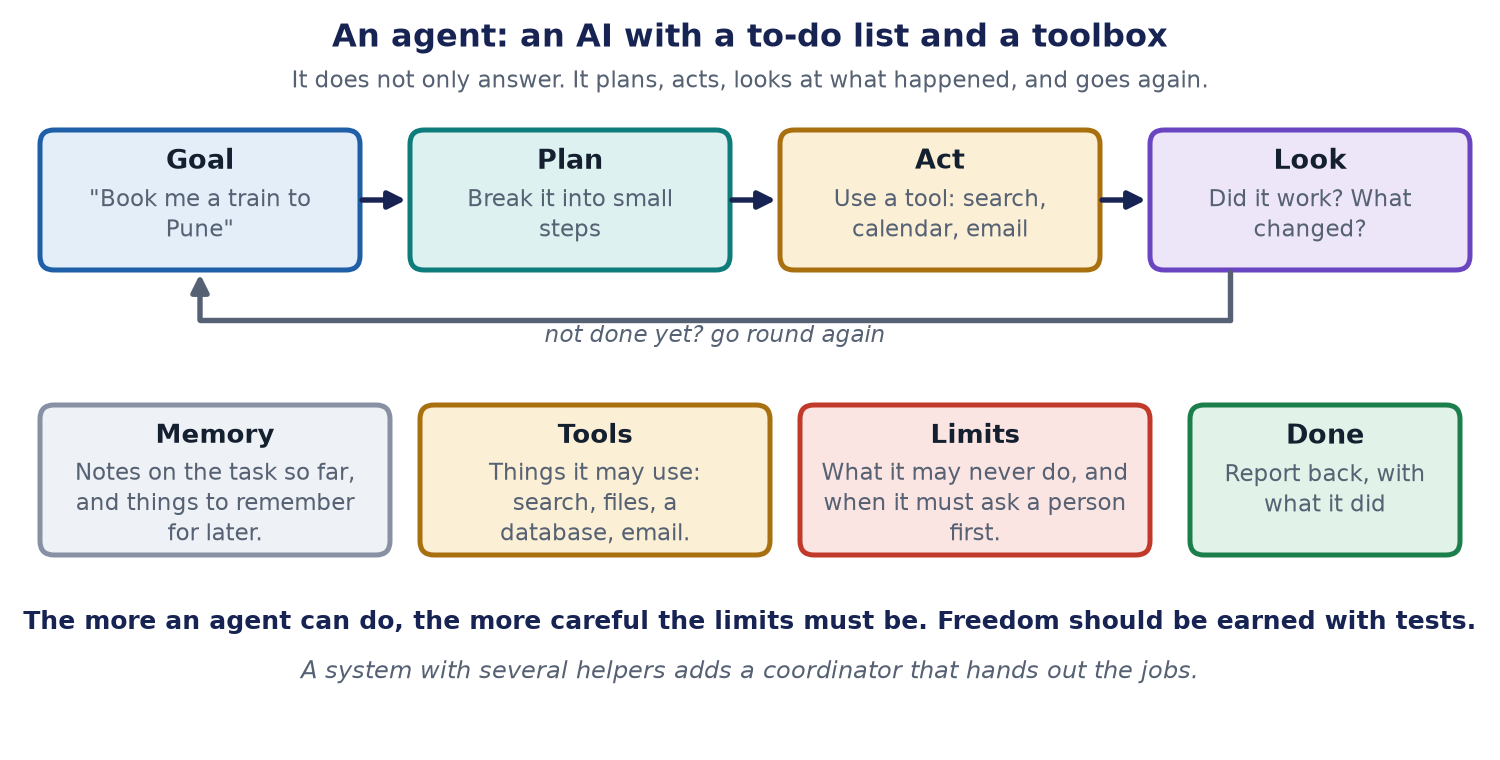
An agent works in a loop.
1. Goal. "Order twenty rolls for Friday for this customer." 2. Plan. Break it into small steps. Are there twenty rolls free on Friday? Create the order. Send a confirmation. 3. Act. Use a tool for the first step. 4. Look. Read what came back. Did it work? Is there a problem, such as "only twelve rolls are free"? 5. Decide. If the job is not done, or something changed, plan again. If it is done, report back and say what was done.
This loop is what makes an agent different from a simple chatbot. It can try, see the result, and adjust.
What an agent is made of
- The model: the part that understands the goal and decides the next step.
- Tools: the list of things it may use, with their exact rules.
- Memory: short-term notes about the job so far, such as "customer wants Friday", and long-term memory for things worth keeping, such as "this customer prefers eggless". Remember that a model only knows what is in front of it. Memory is stored text that is put back in front of it when needed.
- A coordinator: a program that runs the loop and passes messages. In a larger system there may be several helper agents, such as one that plans and others that do the parts. A coordinator hands out the jobs and collects the results.
- Limits: what it may never do, how much it may spend, and when it must ask a person first.
A standard plug for tools
Connecting an AI app to many tools could mean building a different connection for each one. A better way is a shared standard. One standard is the Model Context Protocol, or MCP, introduced by Anthropic and now supported by many tools. It works like a standard plug: if a tool offers a plug that fits, any AI app that understands the plug can use it.
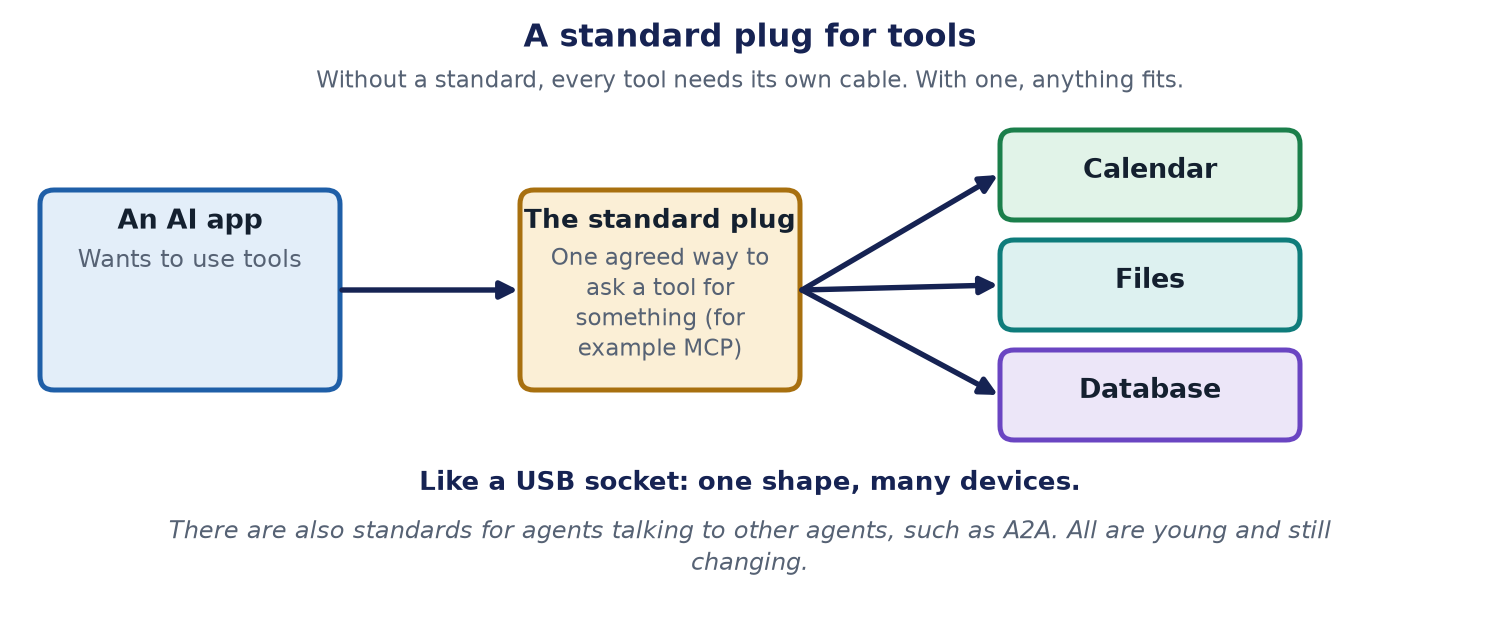
There are also standards for agents that talk to other agents, for example the A2A protocol introduced by Google. All of these standards are young and keep changing, so check their current documents before you build anything.
The more it can do, the more careful it must be
An answer that is wrong can mislead you. An action that is wrong can cost money or hurt someone. So the freedom you give an agent must be earned, step by step.
Here are habits that build safe agents.
- Start small. First let it only watch. Then let it advise. Then let it prepare work for a person to approve. Only later let it act alone, and only inside strict limits.
- Approve the exact action. If a person says yes, the yes must be for that exact action, to that exact person, for that exact amount. If anything changes, the yes stops working.
- Set a budget. Limit the number of steps, the time and the money, so a stuck agent cannot loop forever.
- Make retries safe. If a call times out, the system should check whether the job already ran. It must never do it twice by mistake.
- Fail closed. If the checking system is down, risky actions should stop, not go ahead.
- Keep a record. Write down every step, so people can see what happened and turn mistakes into new tests.
The Journal article Autonomy is earned shows this with a driving-licence picture and an animation, and the animated explainer One question, many safety layers follows a single request through all of these layers.
Back to Asha
Asha gives her helper three tools: check stock, create an order and send a confirmation message. She sets limits. It may create orders up to a fixed size by itself. For anything bigger, or any refund, it must ask Asha, and her yes counts only for that one order. It also has a step limit, so it cannot get stuck. Customers now get orders confirmed in minutes, and Asha sleeps better.
Words explained
- Agent: an AI that plans a job and uses tools to do it in several steps.
- Tool: something an AI is allowed to use, such as a calculator or an order system.
- Memory (for agents): notes stored outside the model and put back in front of it when needed.
- Coordinator (orchestrator): the program that runs the loop and passes messages between the parts.
- MCP: a standard way for AI apps to connect to tools.
- Guardrail: a limit or check that keeps an AI from doing something it should not.
- Fail closed: when a check cannot be done, stop instead of going ahead.
The limits of this chapter
- Agents are a young and fast-moving area. Names and standards change.
- Many systems called "agents" are simple loops with one or two tools. The ideas here still apply, in a smaller form.
- A helper that works well in a demo may still fail in real life. The main book spends many chapters on making agents dependable.
For engineers
- Tool use is typically implemented with function calling: the model receives tool descriptions and a schema, emits a structured call, and the application validates the arguments, executes the call, and returns the result to the model. Validation, authorisation and rate limits belong in application code, not in the prompt.
- Common patterns are a plan-act-observe loop, a router that picks among workflows, and graph-style orchestration where nodes are steps and edges are decisions, with retries and loops handled deterministically in code.
- MCP defines hosts (the AI application), clients (the connector inside the host) and servers (which expose tools, resources and prompts), exchanging JSON-RPC messages over transports such as standard input and output or HTTP. A2A addresses agent-to-agent task exchange with capability discovery.
- Controls to design in: least-privilege tool scopes, exact-action approval bound to the payload, idempotency keys for safe retries, budgets for steps, tokens, time and money, fail-closed policy checks, and tracing of every step. Treat any text read from tools or documents as untrusted data.
Check yourself
- What is the difference between a chatbot and an agent? Answer: A chatbot only answers. An agent plans, uses tools to act, checks the result and repeats.
- Does the model run the tools itself? Answer: No. It writes a request, and the program around it checks and runs the tool.
- Name two limits you would put on an agent. Answer: For example a spending or step limit, and a rule that risky actions need a person's yes for that exact action.